Repository Access Policy
In this section, we will delve into Repository Access Policies in AWS ECR, a powerful feature that allows you to finely control which users or services can interact with the Docker images in your repository. Unlike Identity-based IAM policies, a Repository Policy is a Resource-based policy directly attached to a specific ECR repository.
This enables you to define access permissions (e.g., who can pull or push images) directly at the repository level, adding an additional layer of security and more granular access control.
Objectives of this section
- Understand the role and importance of ECR Repository Policy.
- Clearly differentiate between IAM Identity-based policies and ECR Repository policies.
- Configure a Repository Policy to restrict or grant access.
- Apply the policy to enhance the security of your Docker images.
Repository Policy Concept and Distinction from IAM Policies
To better understand Repository Policies, it’s crucial to differentiate them from IAM Identity-based policies:
IAM Identity-based Policies:
- Attached to an IAM Principal (IAM user, group, or role).
- Determine what actions that Principal is allowed to perform on which resources.
- Example: An IAM policy might allow a specific user to perform the
ecr:PutImageaction on all ECR repositories in the account.
ECR Repository Policies (Resource-based Policies):
- Attached directly to a specific resource (in this case, an ECR repository).
- Determine which Principals are allowed to perform what actions on that specific resource itself.
- Example: A Repository policy might allow an IAM role from another AWS account to access this particular repository.
Permission Evaluation Principle (“AND” Logic):
For a Principal to perform an action on an ECR repository, the action must be permitted by both policies:
- The Principal’s IAM (Identity-based) policy must allow the action.
- The ECR Repository’s (Resource-based) policy must allow the action for that Principal.
If either policy explicitly denies (Effect: Deny) the action, then the action will be denied, regardless of whether the other policy allows it.
This combination provides greater flexibility and detailed control, especially useful in cases such as:
- Granting cross-account access.
- Controlling access for a large number of Principals based on resource attributes.
To learn more about the differences between policy types in AWS, you can refer to the official AWS documentation:
- Private repository policies in Amazon ECR - Repository policies vs IAM policies
- Identity-based policies and resource-based policies - AWS IAM User Guide
Configuring Repository Policy
We will configure a Repository Policy for the fcj-workshop-app repository to demonstrate how to control access. The example below will grant the fcj-ecr-ci-cd-user IAM user (which we created earlier) permissions to push and pull images from this repository.
Access the ECR service:
- In the search bar, type “ECR” and select Elastic Container Registry.

- In the search bar, type “ECR” and select Elastic Container Registry.
Select Repository:
- In the ECR dashboard, click Repositories in the left navigation pane.
- Find and click on your repository named
fcj-workshop-app.
Edit Repository Policy:
- On the
fcj-workshop-apprepository details page, click the Permissions tab. - Click the Edit repository policy button.
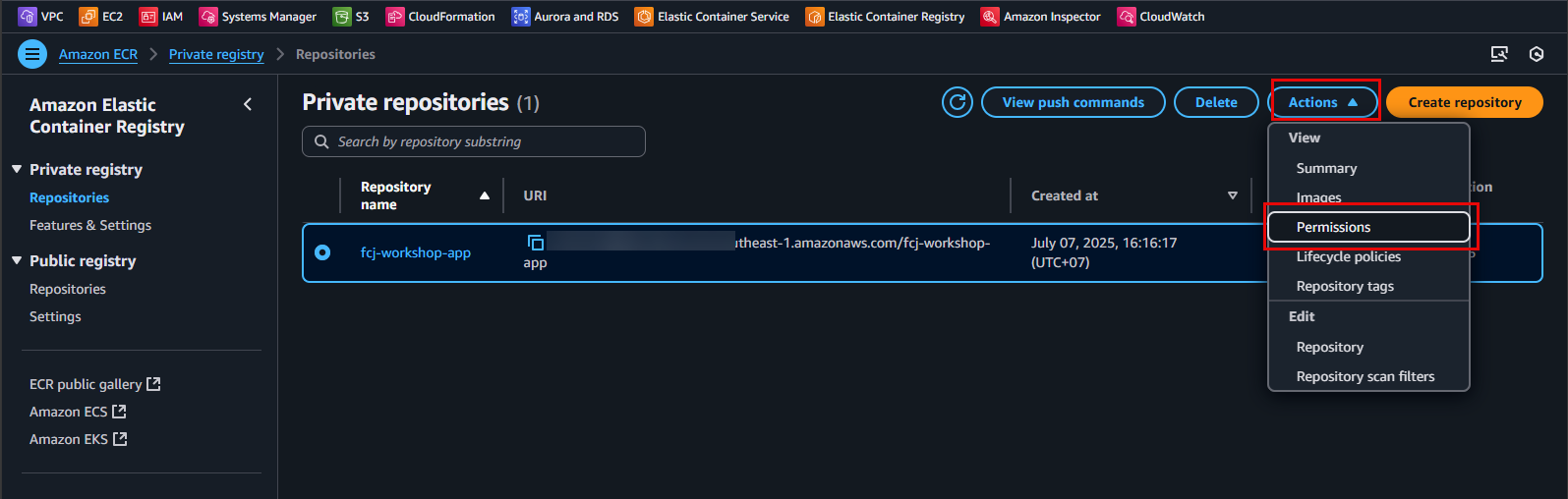
- On the
Paste the Adjusted JSON Policy:
- A JSON editor will appear. Clear any existing content and paste the following secure JSON policy into it:
{
  "Version": "2008-10-17",
  "Statement": [
    {
      "Sid": "AllowPushPullFromCICDUser",
      "Effect": "Allow",
      "Principal": {
        "AWS": "arn:aws:iam::<YOUR_AWS_ACCOUNT_ID>:user/fcj-ecr-ci-cd-user"
      },
      "Action": [
        "ecr:GetDownloadUrlForLayer",
        "ecr:BatchGetImage",
        "ecr:BatchCheckLayerAvailability",
        "ecr:PutImage",
        "ecr:InitiateLayerUpload",
        "ecr:UploadLayerPart",
        "ecr:CompleteLayerUpload"
      ]
    }
  ]
}
Replace
<YOUR_AWS_ACCOUNT_ID>with your AWS Account ID. You can find your AWS Account ID by clicking on your account name in the upper right corner of the AWS Management Console.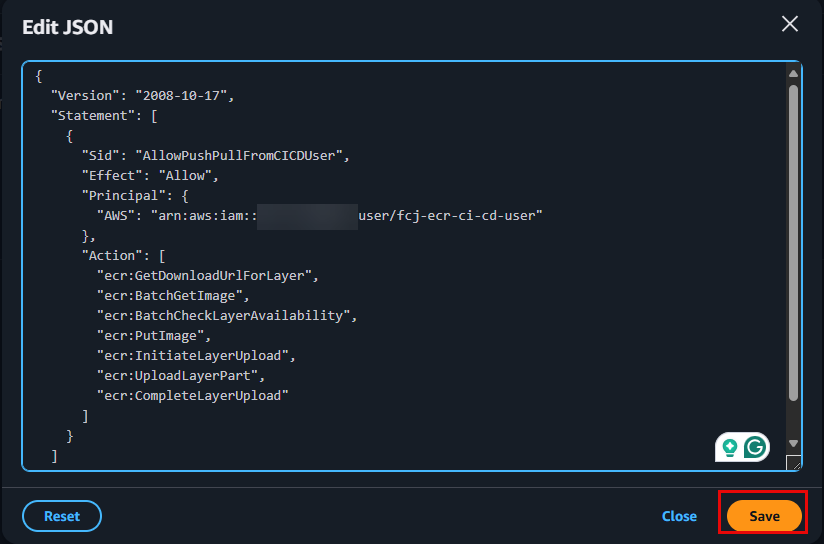
Save policy and result:
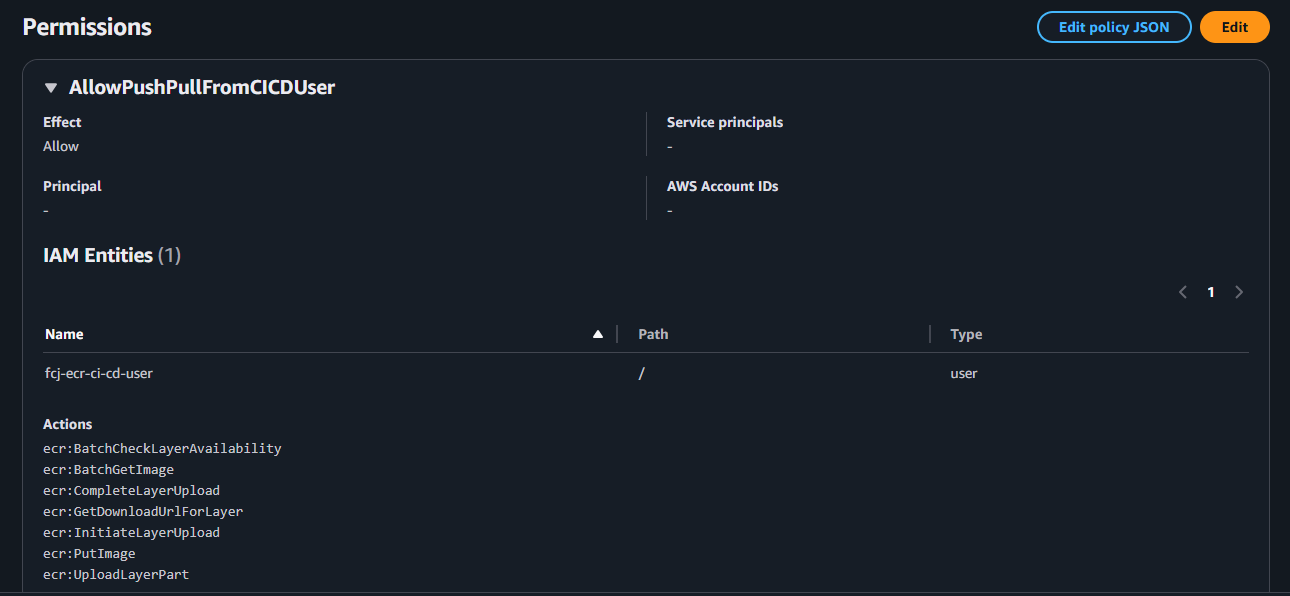
Repository Policy Explanation
Sid: "AllowPushPullFromCICDUser"Grants the IAM userfcj-ecr-ci-cd-userthe necessary actions to pull and push Docker images:ecr:GetDownloadUrlForLayer: Retrieves the URL to download an image layer.ecr:BatchGetImage: Retrieves metadata and configuration for multiple images.ecr:BatchCheckLayerAvailability: Checks if image layers are available in the repository.ecr:PutImage: Pushes an image manifest to the repository.ecr:InitiateLayerUpload: Initiates the upload process for an image layer.ecr:UploadLayerPart: Uploads a part of an image layer.ecr:CompleteLayerUpload: Completes the image layer upload process.
You have successfully configured the Repository Access Policy for your ECR repository securely. This policy will enhance security by providing tighter control over access to your Docker images.